Classic Bowling Unblocked — Play Free Online
More Ball Sports games

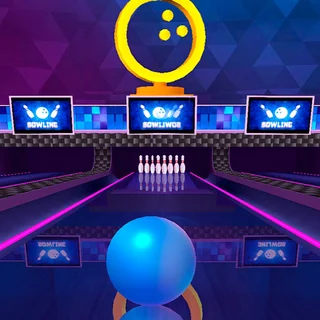




Classic Bowling unblocked: play Classic Bowling online free right here in your browser — no download, no sign-up, works on a school Chromebook.
What is Classic Bowling?
Classic Bowling is a 3D sports game that brings the authentic ten-pin bowling experience to your web browser. Players take to the lane to aim their shots, calibrate throwing power, add curve spin, and knock down pins across ten complete frames. The game runs smoothly on desktop and mobile devices without requiring downloads or software installation.
Key features
- Three-step shot meter: Line up your position on the foul line, freeze the power bar, and set ball spin with timed inputs.
- Ten-pin physics simulation: Realistic pin collisions make pins wobble, bounce, and sweep across the deck.
- Standard bowling rules: Play through ten frames with official scoring for strikes, spares, and open frames.
- Hook control: Apply left or right curve to steer the ball directly into the pocket between the pins.
- Cross-platform support: Responsive HTML5 mechanics allow effortless play with keyboard controls or touchscreen taps.
How to play
- Observe the lane and slide your bowler left or right along the foul line to choose your starting angle.
- Lock your alignment and trigger the vertical power gauge to build throwing momentum.
- Stop the power meter near your target strength before it resets.
- Time the swinging directional curve indicator to apply hook spin toward the head pin.
- Release the ball down the lane and watch the pin physics unfold on the deck.
- Clear any remaining pins on your second throw to secure a spare.
Controls
| Action | Keyboard | Touch |
|---|---|---|
| Position bowler | Left and Right arrow keys | Drag or tap screen |
| Set power | Space bar | Tap screen |
| Set spin effect | Space bar | Tap screen |
Throw mechanics and lane alignment
Success in Classic Bowling depends on mastering the three distinct phases of every delivery. Positioning the bowler slightly off-center gives the ball room to curve back toward the center pin. Rather than stopping the power meter at absolute maximum, hitting around three-quarters power preserves accurate trajectory while retaining plenty of kinetic force to scatter the rack. Timing the curve arrow ensures the ball hooks directly into the pocket between pin one and pin three, maximizing strike probability.
Tips and strategy
- Target the pocket rather than hitting the lead pin dead center, as pocket shots cause chain reactions that clear corner pins.
- Watch the spin arrow complete one full cycle before pressing, allowing you to gauge the timing rhythm accurately.
- Avoid maximum power on split spare conversions where delicate angle placement matters more than raw ball speed.
- Adjust your starting position opposite to your intended hook direction so the ball has adequate lane width to sweep inward.
Versions and similar games
Classic Bowling delivers a quick, single-lane arcade break alongside the team sports on this site. If you enjoy precision ball sports and strategic timing, you can explore several other titles in our sports lineup:
- Retro Bowl: A retro-styled football management simulation where you call offensive plays, manage roster morale, and pass downfield.
- Touchdowners: A physics-based sports duel where jumping athletes battle to spike the ball into the end zone.
- American Football Challenge: A precision sports challenge focusing on route timing, catching mechanics, and field goal kicks.
Developer and history
Classic Bowling was released on October 11, 2016. Built using HTML5 web standards, it delivers fast-loading ten-pin physics directly in modern web browsers across desktop computers, tablets, and smartphones.
Questions about Classic Bowling
Is Classic Bowling unblocked at school?
Classic Bowling runs in an ordinary browser tab from retrobowlpoki.com, with nothing to download or install, so it plays on most school Chromebooks and work computers. If a network filter blocks the site, only that network's administrator can change it.
How do you control the ball in Classic Bowling?
Use the Left and Right arrow keys to position your bowler along the lane, then press Space to set your throwing power and ball spin. On mobile devices, tap the screen to time each step.
How many frames are played in Classic Bowling?
A standard match consists of ten frames following official ten-pin bowling rules, complete with strike bonuses and spare calculations.
Can you play Classic Bowling on mobile devices?
Yes, Classic Bowling is built with HTML5 technology and runs directly in mobile browsers using intuitive touch and tap controls without downloading an app.